
Range Control Panel Not Responding? Common Causes & What to Do
In this article
The range has power, but tapping the touchpad or pressing a button does nothing. You can't select an oven temperature or start cooking, and dinner is on hold.
The explanation may be as simple as Control Lock being turned on or a temporary electronic freeze. A failed touchpad, electronic control board, or electrical connection can produce similar symptoms, so a lit display doesn't tell the whole story.
This Allsafe Appliance Repair guide explains six possible causes, safe homeowner checks, and when to call for repair. Symptoms alone cannot identify a failed part.
Why Is My Range Control Panel Not Responding?
The panel accepts your selections and passes them to the electronics that coordinate cooking. A lock setting can intentionally block those selections, while a problem with the interface, power supply, or another component can interrupt the same process.
Before trying a fix, note what you can observe without starting a cooking cycle:
- Is the display blank, frozen, flickering, or showing its usual clock?
- Is there a lock symbol, a “LOC” message, or an error code?
- Are all buttons unresponsive, or do only certain controls fail?
- Did the problem follow a power interruption, heavy cooking, cleaning, or a spill?
Safety comes before a reset. If you smell gas, leave the building immediately and contact your gas utility or emergency services from outside. Do not operate electrical switches, the circuit breaker, appliance controls, or a phone inside, and do not try to find the leak.
For burning smells, sparks, repeated breaker trips, liquid entering the controls, or operation you cannot stop normally, stop using the range. If there is no gas odor, disconnect power at its clearly identified breaker only if you can do so safely from a dry location. Leave it off and arrange professional help. For smoke, fire, or immediate danger, leave and call emergency services. Do not attempt the routine checks below under these conditions.
Keep homeowner checks external: do not move the range, remove panels, bypass safety devices, or test live wiring. The Off button and Control Lock do not disconnect electrical power.
1. The Control Lock Is Turned On
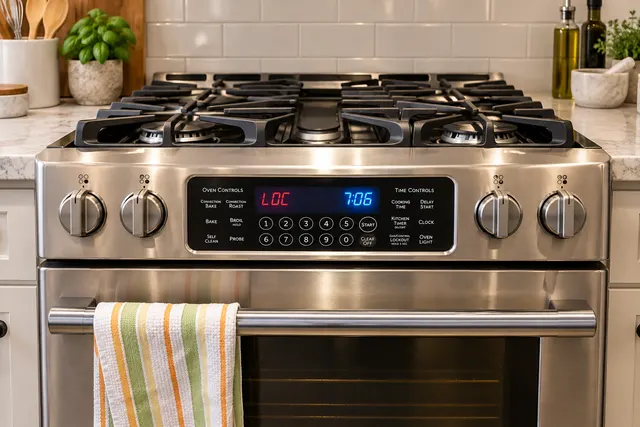
Many modern ranges include a Control Lock or Lockout feature to prevent accidental changes. When it is active, the display may still work while some or all cooking selections are disabled.
Common signs of an active lock include:
- Buttons that do not respond to normal presses.
- A lock icon or “LOC” on the display.
- A working clock or display, but no way to select cooking functions.
Check your model's owner's manual to confirm the message and unlocking procedure. The button, sequence, and hold time vary, so don't copy another range's instructions.
Control Lock may leave knob-controlled burners usable. It also differs from an oven door lock used during self-cleaning. Never force a locked door.
2. The Range Needs to Be Reset
A temporary electronic glitch can leave the panel frozen, sometimes after a power interruption. A manufacturer-directed reset may allow the controls to restart, but it cannot repair damaged wiring or a failed component.
If there are no safety warning signs, follow the manual's reset instructions. Where directed, disconnect power at the range's clearly identified, safely accessible breaker for the specified interval. Use the model's instructions for restoring power and checking the display, not a universal waiting time.
- Note any error code before resetting so you can share it with a technician.
- A tripped breaker is different from a frozen panel; follow the power-supply guidance below.
- If one permitted reset does not help, or the panel freezes again, stop resetting and arrange service.
3. The Touchpad or Control Panel Has Failed
The touchpad or user interface translates your button presses into commands. Repeated use, age, heat, moisture, and internal component failure can affect individual buttons or the entire panel.
Possible signs include:
- Only certain buttons work.
- Buttons respond intermittently.
- The panel beeps but does not accept a command.
- The display looks normal while the controls remain unresponsive.
A lock setting, surface moisture, wiring fault, or control-board problem can look similar. Pressing harder won't identify the cause and may damage the panel.
Some models combine the touchpad and control board into one assembly; others use separate parts. A technician can test the relevant components before recommending replacement.
4. The Electronic Control Board Is Malfunctioning
The electronic control board processes selections and communicates with other components. If it malfunctions, it may not process or send commands correctly, even when some lights or sounds still work.
Possible symptoms of a control-related fault include:
- A blank or frozen display.
- Unexpected, recurring, or inconsistent error codes.
- Controls that work on some occasions but not others.
- Oven functions that do not start after a selection is made.
These symptoms do not prove the board has failed. Supply interruptions, touchpad or wiring problems, and protective responses to other faults can look similar. Error codes indicate what the controls detected, not necessarily which part needs replacing.
If the panel problem is keeping you from using your appliance, schedule professional Hollywood range repair with Allsafe Appliance Repair before replacing parts based on symptoms alone.
5. There Is a Power Supply or Wiring Problem
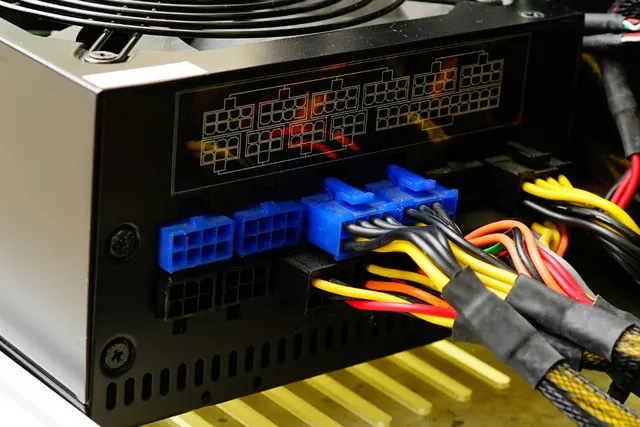
A working clock or oven light doesn't necessarily mean the entire range is receiving proper power. On an electric range, partial supply or a loose connection can leave some functions working while others fail.
Potential causes include:
- A tripped circuit breaker or interrupted household supply.
- A loose electrical connection.
- A damaged power cord or terminal block.
- An internal wiring or connector fault.
From a safe, dry location, check the clearly labeled range breaker's position without removing the panel cover. If it has tripped and there are no warning signs, turn the range controls off and follow the manufacturer's guidance before attempting a reset. If it trips again, leave it off and arrange professional assessment. Never repeatedly reset it or use an extension cord.
Leave cord, terminal-block, and internal wiring checks to an appliance technician. Household circuit or supply faults may need an electrician.
6. Heat or Moisture Has Affected the Controls
Heat, steam, grease, or moisture may affect controls after heavy cooking, cleaning, or a spill. On touch-sensitive panels, moisture or residue can interfere with button response, while liquid reaching internal electronics can cause damage.
- With cooking stopped and no warning signs present, let the panel cool completely.
- For light surface residue, follow the manual's cleaning and power-isolation instructions. Do not spray cleaner directly into the controls.
- Let the surface dry fully before checking the controls as directed. Do not use a hair dryer or another heat source.
- If liquid entered the panel or there was a substantial spill, leave the range off for service rather than testing it after drying.
If the controls still don't respond once the panel is completely cool and dry, stop troubleshooting and arrange service. A dry exterior does not rule out internal damage.
What If the Range Controls Work but the Burners Do Not?
If the panel responds normally but the range still won't cook, you're likely dealing with a different problem. Here's how to narrow it down by range type.
Gas Range Burner Problems
A gas burner that will not light may have an ignition or gas-delivery problem even when the oven display looks normal. Possible causes include:
- An igniter or spark-system fault.
- A wet, dirty, or incorrectly seated burner assembly.
- A gas supply or internal gas-component problem.
Stop an unsuccessful ignition attempt according to the manual; do not keep releasing gas. For gas odors, follow the emergency guidance above.
When there is no immediate hazard, learn what to check when your gas range isn't igniting. Leave gas-component repairs to a professional.
Induction Range Problems
Induction ranges can accept settings but refuse to heat if they cannot detect suitable cookware or a protective system has stopped a cooking zone. Possible causes include:
- Cookware that is not induction-compatible.
- A pan that is too small or positioned incorrectly for detection.
- Overheating protection.
- An internal electrical, coil, sensor, or control fault.
Check your manual's cookware and pan-placement guidance. See common reasons an induction stove isn't working, and arrange service if the problem persists under normal operating conditions.
Can I Fix an Unresponsive Range Control Panel Myself?
If none of the safety warning signs above are present, stick to these four checks:
- Check Control Lock. Use your model's unlocking instructions.
- Check the breaker. Observe its position and follow section 5's guidance.
- Try a manufacturer-approved reset. Follow the specified procedure and timing.
- Allow cooling and surface drying. Follow the manual for light moisture or residue.
When to Call for Range Repair
Arrange service when the safe checks do not restore normal operation or the problem keeps coming back. Service triggers include:
- The panel stays unresponsive after a manufacturer-directed reset.
- Only some buttons work with Control Lock disabled.
- The display remains blank or flickers.
- Error codes continue appearing.
- The controls respond intermittently.
- The range starts, heats, or changes settings unexpectedly.
- A breaker trips again after a reset, or there are burning smells, sparks, or suspected liquid damage.
If the range operates unpredictably or shows electrical warning signs, stop using it and follow the safety guidance above.
Share any error messages and your model number if available without moving the range. A technician can determine whether the problem is the touchpad, control board, wiring, power supply, or another component before replacing parts.
Get Help With an Unresponsive Range Control Panel
The cause may be a simple lock setting or an internal fault. If basic checks don't restore normal operation, contact Allsafe Appliance Repair for professional range diagnosis and repair.